A doc that writes itself — and never goes out of date
Most AI documents are a snapshot: generated once, stale the next day. TalkBase auto-documents are a process — subscribed to the project stream, they update as work happens. Every change comes to you as a diff to approve. You stay in control; the doc stays current.
Try it free in your browserThe doc is always one meeting behind
Snapshots rot instantly
An AI summary is true the moment it's made and wrong by the next call. Nobody trusts a doc they have to re-verify.
Keeping docs current is a chore
Someone has to remember to update the spec, the changelog, the status. So it doesn't happen, and the doc quietly dies.
“AI will wreck my doc”
Letting a model rewrite your document freely is terrifying — one bad edit and your source of truth is corrupted.
How auto-documents stay alive
Point it at a project
Pick a familiar output — a changelog, a spec/brief, a stakeholder status — and subscribe it to the project stream.
It watches the stream
New calls, decisions, tasks, and messages flow in. The document notices what changed and drafts the update.
You approve the diff
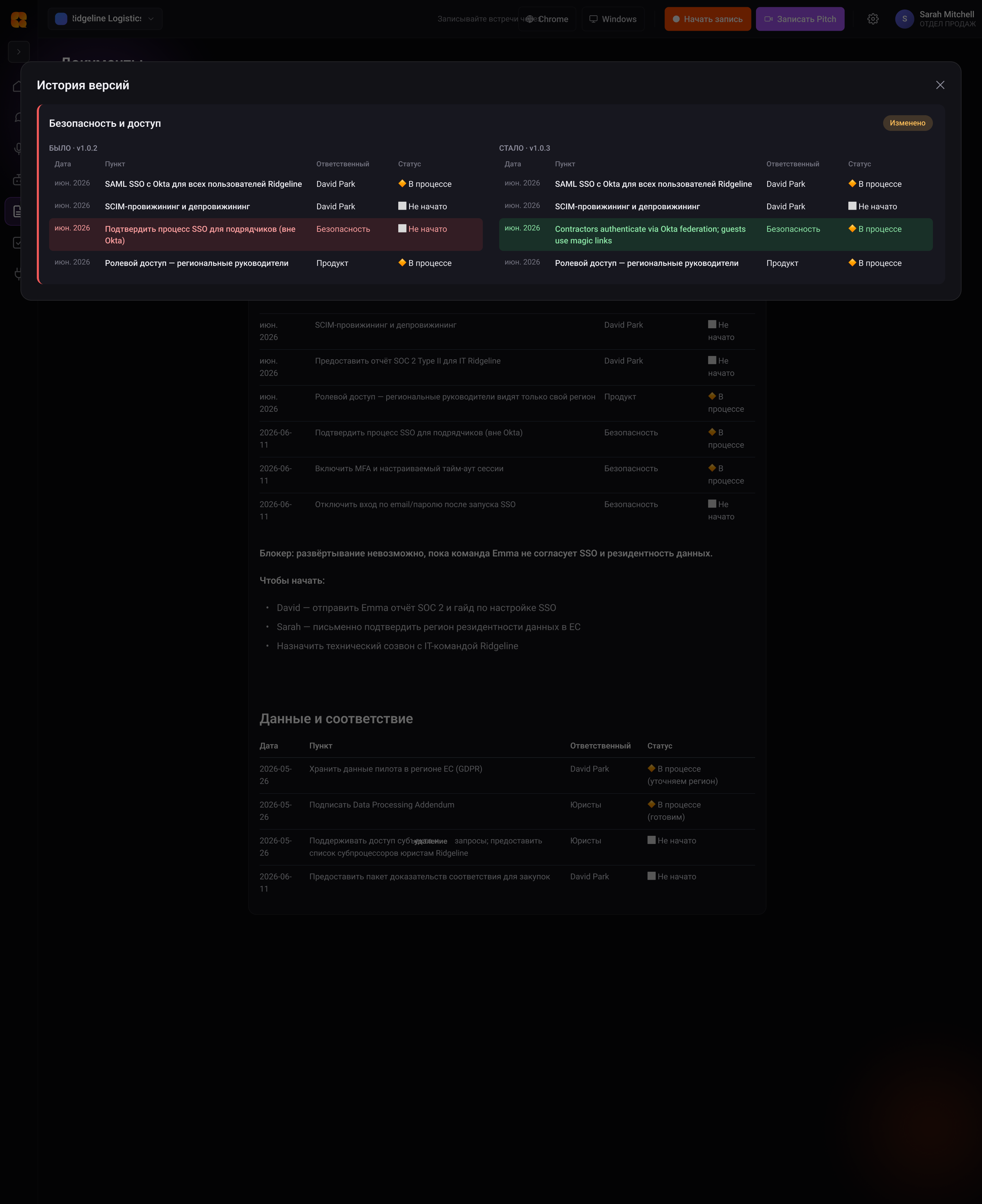
Changes arrive as a proposed diff — accept with one click, or edit first. The AI never silently overwrites your doc.
It stays current on its own
Approved changes merge in. The doc keeps pace with the project instead of drifting out of date.
What auto-documents give you
A living document, updating in place
Let your docs keep themselves up to date — try it in your browser in seconds.
Try it free in your browserSee it in a workflow
What are self-updating documents?
A self-updating document is a doc that subscribes to your project's stream of conversations and updates itself as work happens — a spec, changelog or status that never falls behind. Unlike a one-off AI summary, it's a process, not a snapshot, and every change is proposed as a DIFF you approve.
The problem with AI summaries
A normal AI document is true the moment it's generated and stale by the next meeting. Keeping specs, changelogs and status docs current is manual work nobody has time for, so they quietly rot and stop being trusted.
Documents as a living process
A TalkBase auto-document is bound to the project. As new calls, decisions, tasks and messages arrive, it notices what changed and drafts the update — so your changelog, spec or stakeholder status keeps pace with reality on its own.
You approve every change via DIFF
Nothing is silently overwritten. Each update arrives as a proposed DIFF you accept with one click or edit first — which removes the biggest fear with AI docs: that a model quietly corrupts your source of truth. You stay in control; the doc stays current.
Self-updating documents — FAQ
What kinds of documents can update themselves?
Familiar outputs: a changelog, a spec or brief, and a running status for stakeholders — each subscribed to the project stream and kept current automatically.
Will the AI overwrite my document without asking?
No. Every change is proposed as a DIFF you review — accept with one click or edit first. The AI never silently rewrites your doc.
How is this different from a regular AI summary?
A summary is a snapshot generated once and stale immediately. An auto-document is a process subscribed to the project — it catches up on its own as the project moves.
What does the document draw from?
From the project brain: calls, decisions, tasks and messages captured in the project — so updates are grounded in what was actually said and agreed.
What teams say
Illustrative — replace with real testimonialsWe stopped re-litigating decisions. The answer is always one question away, with the exact quote.
Our docs finally stopped rotting. They update themselves and I just approve the diff.
One project brain — starting free
Standard is $10/mo for unlimited recording. See the full plans and start free.
See pricingWrite it once. Let it keep itself current.
Start free. Turn any project into docs that update themselves — with you approving every change.
Try it free in your browser